App Developers, Time to Get Your Biometrics On!
It’s not every day that a new mobile computing platform enters the market – especially one focused on the critical issue of cyber security and electronic privacy. So, here’s your chance to get on the proverbial bandwagon before the rest of the crowd!
 If you’re in the business – professional or hobbyist – of developing applications that require any level of security, you know that the current tools out there are sorely lacking.
At best, it’s a neck-and-neck arms race against the bad guys and it’s not too difficult to see who’s really winning.
A quick peak at the Breach Level Index Report and you’ll see that there have been over 3.4 BILLION records lost since 2013 and the problem is growing rapidly as more and more of the world is connected.
There are many reasons why the number of breaches continues to grow but one critical issue is that current identification and authorization mechanisms are simply outdated. By that, I mean the use of traditional usernames, passwords, and pins. A second, and no less serious issue, is that most mobile devices are highly vulnerable by nature. If you want to read more about those two specific topics, take a quick look at two of my earlier articles:
We’re obviously just scratching the surface of the problem in this article but let’s talk about a real solution. This is where you, the developer, have an opportunity to give your customers something uniquely better when it comes to application security.
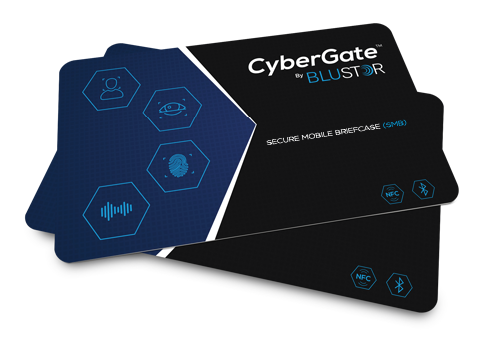
 The BluStor CyberGateTM platform is a sophisticated wireless biometric and data security card that stays safely tucked away in your wallet or purse. Looking something like a credit card, it is capable of supporting wireless multi-factor biometric authentication (facial, iris, fingerprint, etc.) and replaces -or- augments traditional usernames, passwords, and pin numbers. Your biometric templates are never stored on your mobile device, third-party server, or any cloud-based solution. Additionally, the card provides ample data capacity to securely store your most important documents and data – kept safe and secure in your pocket.
Here is a simple use case:
Let’s say you are the developer of a mobile application that stores a user’s website passwords, credit card information, and other important data – very typical of some of the popular password managers currently used by millions of consumers. The data is encrypted but stored on their smartphone or perhaps a cloud-based service. Access is control by a master username and password. Leveraging the built-in Bluetooth interface on their phone, you’d like to make your application far more secure by giving the consumer the option to use wireless biometric identification instead of a master username and password. You’d also like them to be able to store all of that extremely sensitive data directly on the CyberGate card instead of their phone or a cloud-based service.
Implementing the above solution requires two straightforward steps:
- Writing code that directly accesses the CyberGate card API or utilizing one of the provided SDKs, you create a few additional screens within your application that allow the user to enroll and authenticate using one or more biometric templates (e.g., facial recognition). From that point forward, the user can use their biometrics to access the application rather than requiring a master password that is more susceptible to compromise.
- Using the card’s Extended File-Transfer-Protocol (XFTP) API, you give the user the option to store their passwords, credit card information, and other sensitive data directly on the card. This data is encrypted and protected on the card by their biometrics. The card can be paired with multiple devices that the user owns, so there is no longer a need to synchronize the data with a cloud-based solution. The data is now firmly in their control and not in the hands of any third-party.
- The above use-case is obviously just one example of many possibilities but illustrates the basic capabilities of the card when it comes to wireless biometric authentication and secure data storage. Virtually any digital transaction that requires positively identifying the user, authenticating their access, and storing sensitive data is a key opportunity to leverage the BluStor CyberGate platform.
How does an application interact with the CyberGate card?
 User applications communicate and interact with the CyberGate card using the GateKeeper Extended File-Transfer-Protocol (XFTP) API. The GateKeeper XFTP API is loosely based on the commonly used FILE TRANSFER PROTOCOL as specified in the Network Working Group Request for Comments (RFC) document number 959. Adapted to securely operate over a variety of transports, including Bluetooth and NFC, the GateKeeper XFTP API provides a reliable and straightforward mechanism for securely accessing the encrypted data storage and other features of the CyberGate platform.
Proprietary extensions to the standard FTP commands provide developers with additional access to the unique capabilities of the card:
- Biometric authentication and related management
- Card provisioning and management
- Security and data encryption services
- Diagnostic and debug information
- Firmware management
For more information or to place an order, check out the BluStor website.

If you valued this article and want more, please sure via your Twitter, LinkedIn, Google+, Facebook, and other social media outlets. I encourage you to join the conversation or ask questions so feel free to add a comment to this post. Please follow my LikedIn post page for all of my articles.
You can also find me on Twitter at @NewFrontierCIO for more commentary on the frontiers of technology, leadership, space exploration, and science.